
MacBook Pro · 2013–2015
A1502: Apple MacBook Pro 13-inch (2013–2015) Specs & Repair
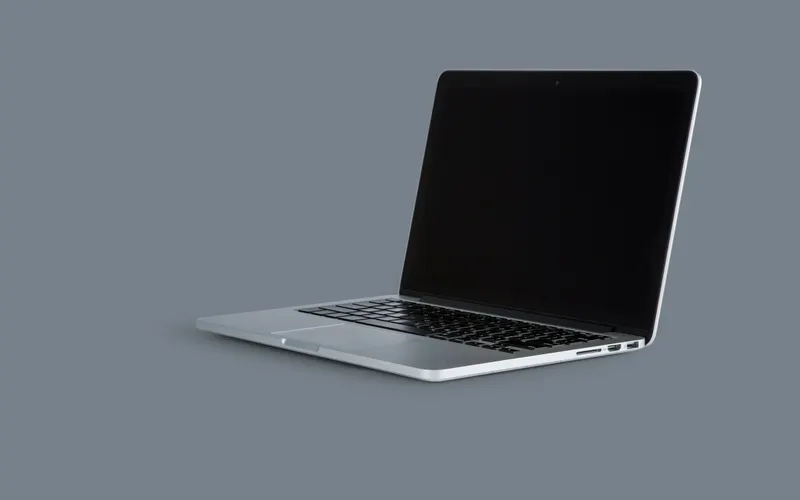
Model number A1502 was used for 3 versions of the MacBook Pro 13.3-inch, from 2013–2015. They look the same but differ in processor and options — the table below shows how to tell which one you have.
- Screen
- 13.3-inch, 2560 × 1600
- Years
- 2013–2015
- Chip
- Intel Core i5 · i7
- Identifier
- MacBookPro12,1, MacBookPro11,1
Which A1502 do you have?
Every version below carries the model number A1502. Open the Apple menu → About This Mac to see the year, then match it here.
| Version | Identifier | Processor options | Specs |
|---|---|---|---|
| MacBook Pro (Retina, 13-inch, Early 2015) | MacBookPro12,1 | 2.7GHz dual-core Intel Core i5, 2.9GHz dual-core Intel Core i5, 3.1GHz dual-core Intel Core i7 | Full specs ↓ |
| MacBook Pro (Retina, 13-inch, Mid 2014) | MacBookPro11,1 | 2.6GHz dual-core Intel Core i5, 2.8GHz dual-core Intel Core i5, 3.0GHz dual-core Intel Core i7 | Full specs ↓ |
| MacBook Pro (Retina, 13-inch, Late 2013) | MacBookPro11,1 | 2.4GHz dual-core Intel Core i5, 2.6GHz dual-core Intel Core i5, 2.8GHz dual-core Intel Core i7 | Full specs ↓ |
MacBook Pro (Retina, 13-inch, Early 2015)
- Model number
- A1502
- Model identifier
- MacBookPro12,1
- Released
- March 2015
- Processor / chip
- 2.7GHz dual-core Intel Core i5 (Turbo Boost up to 3.1GHz), 3MB shared L3 cache
- 2.9GHz dual-core Intel Core i5 (Turbo Boost up to 3.3GHz), 3MB shared L3 cache
- 3.1GHz dual-core Intel Core i7 (Turbo Boost up to 3.4GHz), 4MB shared L3 cache (configure-to-order)
- Memory
- 8GB, 16GB (LPDDR3 1866MHz (onboard)) — not upgradeable
- Storage
- 128GB, 256GB, 512GB, 1TB PCIe-based flash storage
- Display
- 13.3-inch Retina, LED-backlit IPS
- Resolution
- 2560 × 1600 at 227 ppi
- Brightness
- 300 nits
- Display features
- Standard colour gamut (sRGB), 900:1 contrast ratio
- Ports
- MagSafe 2
- 2 × Thunderbolt 2 (up to 20 Gb/s)
- 2 × USB 3 (up to 5 Gb/s)
- HDMI
- SDXC card slot
- 3.5 mm headphone jack
- Wireless
- Wi-Fi 802.11ac (802.11a/b/g/n compatible), Bluetooth 4.0
- Camera
- 720p FaceTime HD
- Keyboard
- Full-size backlit keyboard with ambient light sensor; Force Touch trackpad
- Battery
- 74.9 Wh — Up to 10 hours wireless web; up to 12 hours iTunes movie playback
- Charger
- 60W MagSafe 2 Power Adapter
- Weight
- 1.58 kg
- Size (H × W × D)
- 1.8 × 31.4 × 21.9 cm
- Shipped with
- OS X Yosemite
MacBook Pro (Retina, 13-inch, Mid 2014)
- Model number
- A1502
- Model identifier
- MacBookPro11,1
- Released
- July 2014
- Processor / chip
- 2.6GHz dual-core Intel Core i5 (Turbo Boost up to 3.1GHz), 3MB shared L3 cache
- 2.8GHz dual-core Intel Core i5 (Turbo Boost up to 3.3GHz), 3MB shared L3 cache
- 3.0GHz dual-core Intel Core i7 (Turbo Boost up to 3.5GHz), 4MB shared L3 cache (configure-to-order)
- Memory
- 8GB, 16GB (DDR3L 1600MHz (onboard)) — not upgradeable
- Storage
- 128GB, 256GB, 512GB, 1TB PCIe-based flash storage
- Display
- 13.3-inch Retina, LED-backlit IPS
- Resolution
- 2560 × 1600 at 227 ppi
- Ports
- MagSafe 2
- 2 × Thunderbolt 2 (up to 20 Gb/s)
- 2 × USB 3 (up to 5 Gb/s)
- HDMI
- SDXC card slot
- Headphone port
- Wireless
- Wi-Fi 802.11ac (802.11a/b/g/n compatible), Bluetooth 4.0
- Camera
- 720p FaceTime HD
- Keyboard
- Full-size backlit keyboard with ambient light sensor; Multi-Touch glass trackpad
- Battery
- 71.8 Wh — Up to 9 hours wireless web; up to 9 hours iTunes movie playback
- Charger
- 60W MagSafe 2 Power Adapter
- Weight
- 1.57 kg
- Size (H × W × D)
- 1.8 × 31.4 × 21.9 cm
- Shipped with
- OS X Mavericks
MacBook Pro (Retina, 13-inch, Late 2013)
- Model number
- A1502
- Model identifier
- MacBookPro11,1
- Released
- October 2013
- Processor / chip
- 2.4GHz dual-core Intel Core i5 (Turbo Boost up to 2.9GHz), 3MB shared L3 cache
- 2.6GHz dual-core Intel Core i5 (Turbo Boost up to 3.1GHz), 3MB shared L3 cache
- 2.8GHz dual-core Intel Core i7 (Turbo Boost up to 3.3GHz), 4MB shared L3 cache (configure-to-order)
- Memory
- 4GB, 8GB, 16GB (DDR3L 1600MHz (onboard)) — not upgradeable
- Storage
- 128GB, 256GB, 512GB, 1TB Flash storage
- Display
- 13.3-inch Retina, LED-backlit IPS
- Resolution
- 2560 × 1600 at 227 ppi
- Ports
- MagSafe 2
- 2 × Thunderbolt 2 (up to 20 Gb/s)
- 2 × USB 3 (up to 5 Gb/s)
- HDMI
- SDXC card slot
- Headphone port
- Wireless
- Wi-Fi 802.11ac (802.11a/b/g/n compatible), Bluetooth 4.0
- Camera
- 720p FaceTime HD
- Keyboard
- Full-size backlit keyboard with ambient light sensor; Multi-Touch glass trackpad
- Battery
- 71.8 Wh — Up to 9 hours wireless web; up to 9 hours iTunes movie playback
- Charger
- 60W MagSafe 2 Power Adapter
- Weight
- 1.57 kg
- Size (H × W × D)
- 1.8 × 31.4 × 21.9 cm
- Shipped with
- OS X Mavericks
Repairs on the A1502
Cracked or faulty screen
The Retina display is replaced as a complete assembly. Patchy, worn-looking patches on the screen are usually the anti-reflective coating wearing off, not a fault in the panel.
MacBook Pro screen replacement →Battery
Even the newest A1502 is now 11 years old, so a worn battery — short runtime, "Service Recommended", or a swollen battery lifting the trackpad — is often the first thing to need replacing.
MacBook battery replacement →Liquid damage, no power or no charging
Liquid spills, a dead charging port or a MacBook that will not power on are usually board-level faults we can diagnose and often repair, rather than a write-off.
Apple Mac repairs →Got a A1502 that needs fixing? Tell us the fault — diagnosis over the phone is free, any hour.
Call 0478 953 755A1502 questions
What MacBook is model A1502?
A1502 is the MacBook Pro 13-inch (2013–2015). Apple used this model number for 3 versions: MacBook Pro (Retina, 13-inch, Early 2015); MacBook Pro (Retina, 13-inch, Mid 2014); MacBook Pro (Retina, 13-inch, Late 2013). Check About This Mac to see which year yours is.
How old is a MacBook with model number A1502?
MacBooks with model number A1502 were released between 2013 and 2015, so they are now about 11–13 years old. The exact year is shown in About This Mac.
What screen does the A1502 have?
The MacBook Pro 13-inch (2013–2015) has a 13.3-inch Retina, LED-backlit IPS display at 2560 × 1600 (227 pixels per inch). A replacement must be the exact panel for A1502 — screens are not interchangeable between model numbers.
Where do I find the model number on my MacBook?
Turn the MacBook over: the model number is printed in small text on the underside, as "Model A" followed by four digits, such as A1502. You can also check the Apple menu → About This Mac, which shows the model name and year.